Slack-Style Team Chat Inside HighLevel
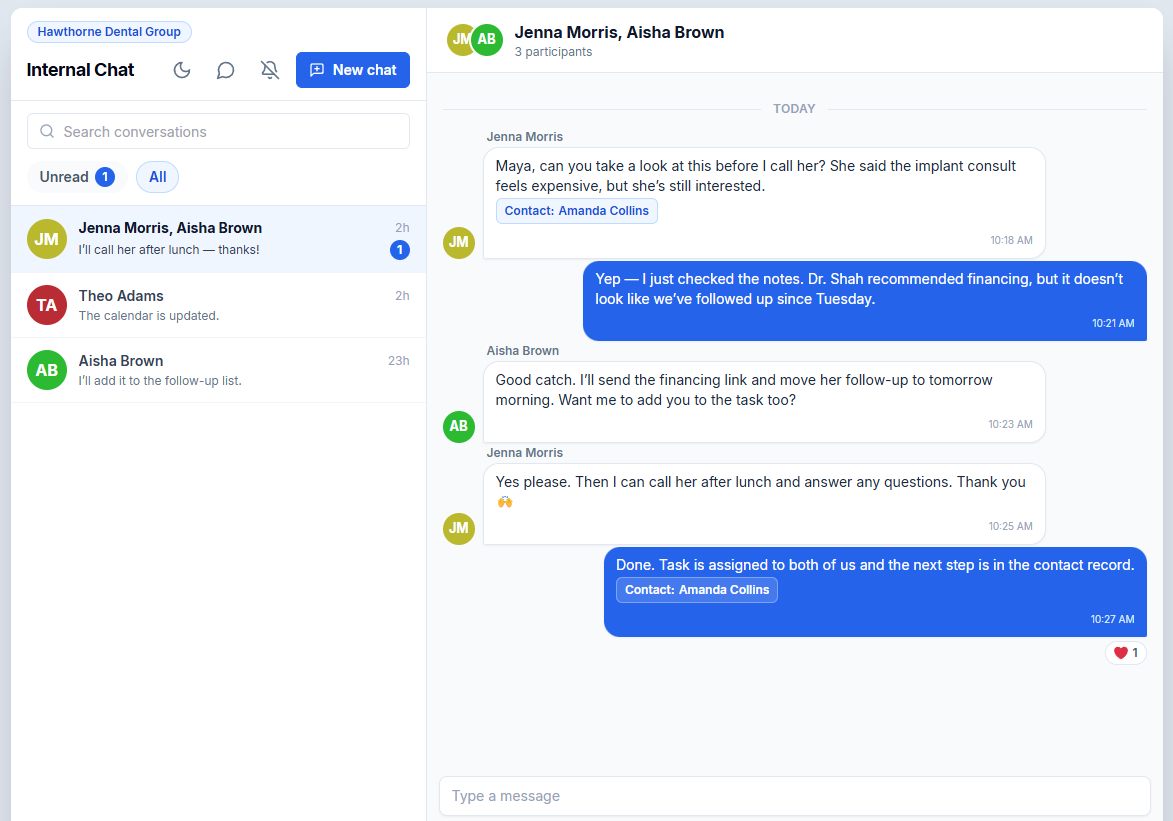
Slack-style team chat is now built right into GHL Customizer - a new Internal Chat app that opens straight from a header button, the same way the Tasks and Appointments apps do.
It runs on HighLevel's own native internal chat, so your messages also land in the standard internal chat area. The app just pulls it front and centre, since your team is rarely sitting in that screen.
What it does
- Open it from any page inside HighLevel - send a message and it pops up on your teammate's end in real time
- Improved notifications, so messages actually get seen
- React to messages with a thumbs-up or any other emoji, just like Slack
- Create and name group chats
- Link a message to an existing opportunity or contact - they can click straight through to the exact record you're talking about
- See when a message hits another account, jump over, reply, and click through to what was referenced
All the Slack-style back-and-forth you'd expect, running on HighLevel's native chat.
How to add it:
GHL Customizer > Header Buttons > add a new button > choose the App action > pick Internal Chat
While you're there, check out the Calendar Appointments and Task Manager apps too - both are worth a look.
Try it out and let us know what you think.